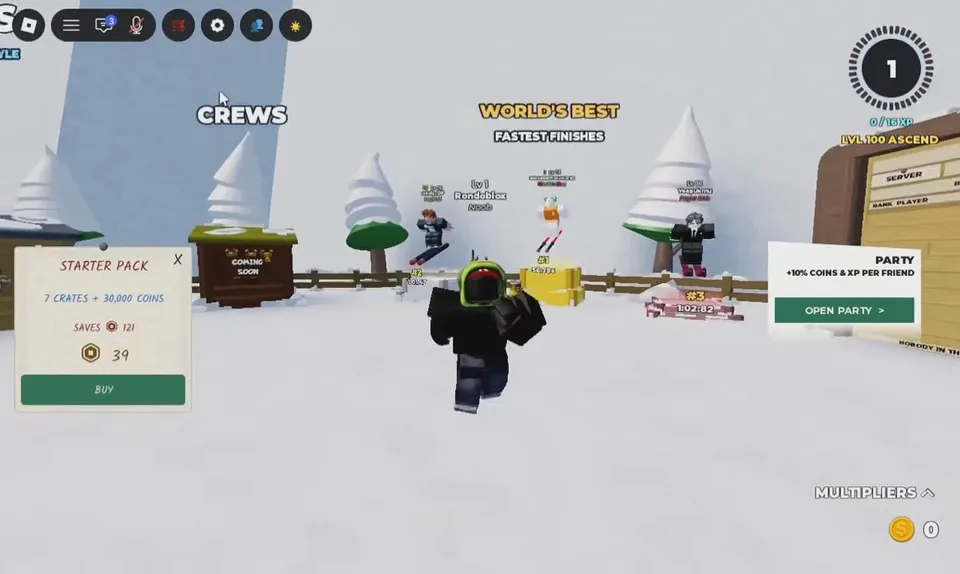
You can race from the hub, from a player request, or by comparing finishes on the leaderboards. Rewards for a race are described as the same as a normal run, so racing is a format change, not a separate loot mode.
Quick Race
- Spawn in the central hub.
- Walk to the left-side row of wooden huts, past the central board, toward Shop and Quests.
- Stop at the hut labeled QUICK RACE. Floating text has been read as GO! – FURTHEST DOWN and STEP ON THE PAD TO JOIN.
- Stand on the round pad in front of the hut. Matchmaking starts by itself. The mode holds up to 10 players.
- Stay on the pad. A queue line such as NEED 1 MORE PLAYER 0/10 means you are still waiting. Stepping off returns you to the hub.
One writeup calls the pad blue, another calls it glass. Use the QUICK RACE sign, not the color, to confirm the station.
Direct races and parties
RACE REQUESTS defaults to on, so another player can challenge you. Turn that toggle off in Settings if pop-ups hit during a run. GROUP INVITES also defaults to on.
The HUD party prompt has been shown granting +10% Coins and +10% XP per friend in the group. That figure is from the on-screen prompt in a September 2026 explainer, not from a patch note. Group up, then read the prompt in your own session if the percentage matters.
The Skin Inventory TRADE button can start a trade, a race, or a group invite. An empty server asks you to bring someone in first.
Leaderboards and private servers
The hub has boards for the fastest finishes and for the top Robux donor. Fastest-finish boards are the record chase. Donor boards are not a skill ranking.
Private-server owners can change course length and difficulty from the top bar. Use the same settings when you compare lines with a friend. Otherwise a shorter hill will look like a better pilot.
Crews has been seen as a stall marked Coming Soon. Do not look for a crew bonus until that stall actually opens.