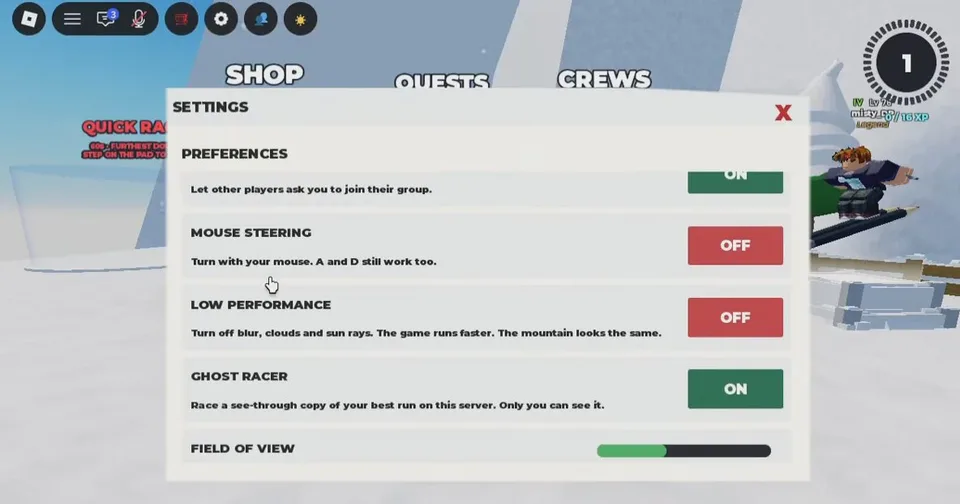
Almost every preference sits in one SETTINGS window. There is no separate save button. Closing the window keeps the change.
Open it
- Look at the top-left HUD row. The reported order is the Roblox menu, chat, microphone, reset character, a shop tag, the gear, a teleport compass, and a star.
- Click the gear between the shop tag and the compass.
- Scroll the PREFERENCES list. Audio is at the top. Graphics sliders are at the bottom.
- Close with the red X in the upper-right of the window.
Audio
| Control | What it does |
|---|---|
| SKIS | Volume for skis, wind, jumps, crashes, and pickups |
| MUSIC VOLUME | All the way down silences music and leaves ski sounds |
| MUSIC LIBRARY | Current track, CHOOSE SONGS, and SKIP SONG |
| YOUR OWN MUSIC | Paste a Roblox audio ID. Several IDs can be separated by commas, such as 123, 456. An empty box keeps the game music |
Toggles
| Toggle | Default | While on |
|---|---|---|
| TRICKS | On | Trick inputs work. Off leaves steer and jump only |
| TRADE REQUESTS | On | Other players can ask to trade |
| RACE REQUESTS | On | Other players can challenge you |
| GROUP INVITES | On | Other players can invite you |
| MOUSE STEERING | Off | Mouse steers, and A / D still work |
| GHOST RACER | On | Your own best run on this server, visible only to you |
| LOW PERFORMANCE | Off | Turns off blur, clouds, and sun rays. The course layout stays |
Turn off trade, race, and group requests when pop-ups break a fast line.
Sliders
FIELD OF VIEW widens or narrows the camera. Setting it to 0 keeps the current camera. LOADING DISTANCE changes how far terrain draws. Nearby obstacles stay loaded, and 100% is the current distance. Each slider has a RESET button.
If a button you expect is missing
Code lists from late September say to click your character and open Codes. Lists from October 3 describe a book icon in the top-left and a Codes icon at the bottom of that book. If neither is there, rejoin a server after you have fully spawned before you assume codes were removed. The string still has to match, including lowercase on alpha1 and iloveskiing.